RampCORE
by TheBRHub
Warm Up Marketing Campaigns,
Not Just Domains.
Your domains are warmed. Your authentication is set. Now it's time to ramp campaign volume — and most teams get this part wrong. RampCORE builds ESP-aware warmup schedules that respect provider rate limits so your marketing campaigns hit the inbox from day one.
Built for the phase after domain warmup — when you're sending real campaigns through SendGrid, Amazon SES, Microsoft 365, and other ESPs at scale.
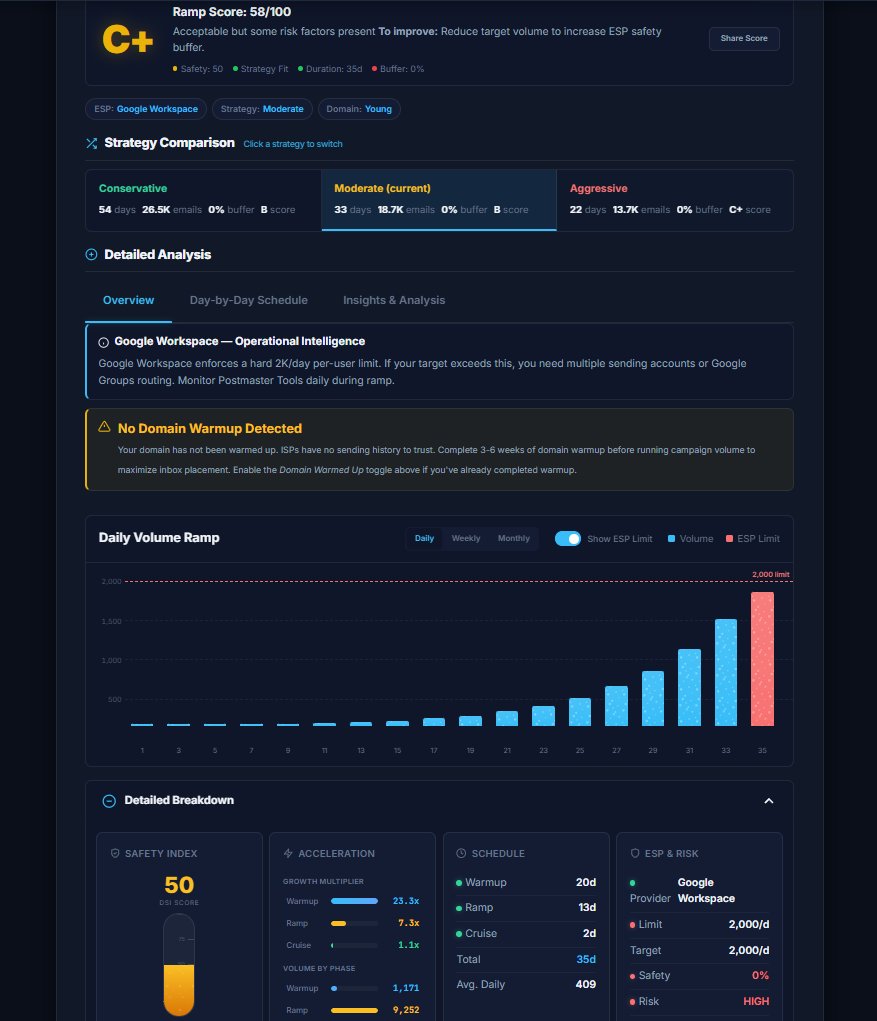
Campaign Ramp Calculator
Build a safe volume warmup schedule for your marketing campaigns — respects your ESP's rate limits.
| Day | Phase | Daily Vol. | Cumulative | % of Target | Progress |
|---|
Domain's warm. Campaigns still failing.
Most teams spend weeks warming their domain, then blast full-volume campaigns on day one. That's where sender reputation dies.
Ramping Campaigns Too Fast
Going from 0 to 50,000 campaign emails in a week triggers throttling and spam filters. ESPs watch volume patterns on every sending account — not just the domain.
Ignoring ESP Rate Limits
Microsoft 365 caps at 10,000/day. Google Workspace at 2,000. Even SendGrid has soft limits on new accounts. Most teams don't even know these exist until they hit them mid-campaign.
No Post-Warmup Plan
Domain warmup tools stop once the domain is "warm." Nobody builds you a plan for what happens next — when you're sending real campaigns through your ESP at scale. That gap is where deliverability breaks down.
Campaign warmup that respects rate limits.
Every schedule is built around your ESP's actual sending constraints — not generic advice.
ESP Rate Limit Intelligence
12+ ESP profiles with real daily sending limits, throttle thresholds, and warmup-specific rules baked into every schedule.
Campaign-First Approach
Designed for the phase after domain warmup — when you're sending newsletters, drip sequences, and marketing blasts through your ESP.
Day-by-Day Schedules
No guesswork. Get a concrete daily volume plan with phase indicators, risk assessment, and progress tracking.
Risk-Aware Analytics
Real-time risk scoring, throttle probability, and volume safety margins calculated against your ESP's documented limits.
Agency Multi-Client
Manage warmup schedules across dozens of client accounts. Export plans, track progress, and report results — built for agencies and MSPs.
Throttle Alerts
Get warned before you breach ESP limits. Smart alerts flag when your volume is approaching thresholds — before the damage is done.
Why agencies choose RampCORE.
See how ESP-aware campaign warmup compares to what most teams do today.
| Capability | RampCORE | Manual Spreadsheets | Generic Warmup Tools |
|---|---|---|---|
| ESP rate limit awareness | ✓ 12+ profiles | ✗ Manual lookup | ✗ Ignored |
| Campaign volume ramp (post-warmup) | ✓ Purpose-built | ~ DIY formulas | ✗ Domain only |
| Day-by-day schedule generation | ✓ Automatic | ~ Hours of work | ✗ Not available |
| Throttle risk assessment | ✓ Real-time DSI | ✗ None | ✗ None |
| Domain age calibration | ✓ 4 tiers | ~ Guesswork | ~ Basic |
| Client-ready PDF reports | ✓ White-label | ✗ Manual design | ✗ Not available |
| Calendar export (ICS) | ✓ | ✗ | ✗ |
| Compare configurations | ✓ Side-by-side | ~ Copy/paste | ✗ |
| Cost | Free / from $19/mo | Your time | $30-99/mo |
Plans that scale with your sending.
Start free with the Ramp Calculator. Upgrade when you need campaign tracking, multi-client, and automation.
Email warmup intelligence.
Quick-reference guides covering the concepts behind RampCORE's calculations.
What is ESP Throttling?
ESP throttling is when your email service provider deliberately slows or limits your sending rate. It happens when you exceed daily limits, spike volume too quickly, or trigger abuse-detection systems.
Microsoft 365 enforces a 10,000 email/day tenant limit — exceed it and you get NDR code 4.7.500. Google Workspace caps at 2,000/day for standard accounts. SendGrid uses a reputation-based system where new accounts start throttled and earn higher limits over time.
The key insight: throttling is not punishment — it's protection. ESPs throttle to prevent their IP ranges from being blacklisted by receiving servers. When RampCORE builds a schedule that stays below 80% ESP capacity, it's leaving headroom for transactional email spikes and natural volume fluctuations.
Why Domain Age Matters
Inbox providers (Gmail, Outlook, Yahoo) maintain reputation scores for every sending domain. A brand new domain has no history — it starts at neutral, which ISPs treat as suspicious until proven otherwise.
New domains (0-30 days) get the tightest scrutiny. Google typically takes 5-7 days of consistent low-volume sending before upgrading a domain's trust level. Microsoft needs 7-14 days. During this window, even small volume spikes can trigger spam classification.
Mature domains (1+ year) have earned accumulated trust. They can handle faster ramps and higher volumes because ISPs have months of positive data. RampCORE adjusts starting volumes by up to 30% based on domain maturity — a mature domain might start at 65 emails/day while a new domain starts at 20.
DMARC During Warmup
DMARC (Domain-based Message Authentication, Reporting & Conformance) is critical during warmup because it tells ISPs how to handle emails that fail SPF or DKIM authentication checks.
Before warmup: Set DMARC to p=none with reporting enabled. This lets you monitor authentication failures without impacting delivery. Many warmup issues are actually DKIM alignment problems that only surface under DMARC reporting.
During warmup (days 1-14): Keep p=none and monitor daily DMARC aggregate reports. Fix any alignment issues immediately. After 14 days of clean data, move to p=quarantine.
Post-warmup: Graduate to p=reject for maximum protection. This tells ISPs to block any email claiming to be from your domain that fails authentication — protecting both your reputation and your recipients.
Reading Bounce Codes
Bounce codes tell you exactly why an email failed to deliver. During warmup, monitoring these codes is more valuable than open rates.
4xx (Soft Bounces) — Temporary failures. The server accepted the connection but deferred delivery. Common during throttling. 421 = "try again later" (rate limiting). 450 = "mailbox busy". These usually resolve on retry.
5xx (Hard Bounces) — Permanent failures. 550 = "user unknown" (bad address). 551 = "user not local" (forwarding issue). 553 = "authentication required". Remove hard bounce addresses immediately — continued sending to known-bad addresses destroys sender reputation.
Critical threshold: If total bounce rate exceeds 5% on any single day during warmup, pause sending for 24 hours and reduce volume by 30% when resuming. If hard bounces exceed 2%, your list has quality issues that need cleaning before continuing the ramp.
Campaign Ramp vs. Domain Warmup
These are two different processes that people frequently confuse. Domain warmup establishes sender reputation for a new or dormant domain. Tools like Instantly, Lemwarm, and Warmbox automate this by exchanging emails between a network of mailboxes — simulating natural sending patterns. This takes 2-4 weeks.
Campaign ramp is what happens after your domain is warm. You now need to gradually increase the volume of your actual marketing emails through your ESP. Even with a perfectly warm domain, jumping from 0 to 50,000 campaign emails will trigger ESP throttling and ISP velocity filters.
Think of it this way: domain warmup is getting your driver's license. Campaign ramp is learning to drive on the highway. You need both, in that order. RampCORE handles the second part — building ESP-aware volume ramp schedules for your marketing campaigns.
Monitoring Tools to Set Up
Before starting any warmup or campaign ramp, configure these free monitoring tools:
Google Postmaster Tools — Shows your domain reputation with Gmail (bad/low/medium/high), spam rate, authentication results, and delivery errors. Set up at postmaster.google.com. Takes 24-48 hours to start showing data.
Microsoft SNDS — Smart Network Data Services shows how Microsoft views your sending IPs. Reports on spam traps, complaints, and filtering status. Register at sendersupport.olc.protection.outlook.com.
MXToolbox — Free blacklist monitoring. Check your sending IPs and domain against 100+ blacklists. Set up alerts for immediate notification if you land on a list during your ramp.
Your ESP Dashboard — Every ESP provides bounce rate, complaint rate, and delivery metrics. Set up webhook notifications for bounce rates exceeding 2% and complaint rates exceeding 0.1%.
Common questions.
Domain warmup tools (Instantly, Lemwarm, Warmbox) focus on establishing sender reputation for new domains by exchanging emails between a network of mailboxes. RampCORE picks up where they leave off. Once your domain is warm, you need to gradually ramp the volume of your actual marketing campaigns on your ESP — SendGrid, Amazon SES, Microsoft 365, etc. That's what RampCORE does. It builds campaign-specific schedules that respect your ESP's rate limits.
A warm domain establishes your baseline reputation. But ESPs also track sending patterns on your account. If you suddenly jump from 0 to 50,000 emails through SendGrid, their systems (and receiving mail servers) will flag that spike — even if your domain has good reputation. Campaign warmup gradually increases your sending volume so both your ESP and inbox providers see a natural, consistent growth pattern.
We maintain profiles for 12+ ESPs including Google Workspace (2,000/day), Microsoft 365 (10,000/day), SendGrid (up to 600K/day), Amazon SES (up to 1M+/day), Mailgun (300K/day), Mailchimp, Postmark, SparkPost, Brevo, Instantly.ai, SMTP.com, Elastic Email, and a custom option. Each profile includes the provider's documented daily limits, typical throttle thresholds, and warmup-specific recommendations.
Yes — if your ESP supports it. Amazon SES and SendGrid both support daily volumes well into the millions for established accounts. RampCORE's calculator handles targets up to 10M/day. The key is the ramp. You can't go from 0 to 2 million overnight. The calculator builds a gradual schedule that scales your volume safely over days or weeks, depending on your ESP and domain maturity.
The calculator is free forever. No signup required. Generate as many warmup schedules as you need. Paid plans add campaign tracking, progress dashboards, team collaboration, export options, and multi-client management for agencies.
Stop Guessing Campaign Volumes.
Join the waitlist for RampCORE and get notified when campaign tracking, multi-client management, and automation go live.